For Excel-first manufacturing teams
Excel to Rupee-Wise Factory Loss & Action Dashboard
Upload downtime Excel/CSV logs and see where money is being lost by machine, reason, and shift without PLC, SCADA, or cloud rollout.
Built for Excel-first manufacturing teams and MSME factories that want rupee-wise downtime visibility without a heavy rollout.
No PLC required
No SCADA required
Local-first pilot
Excel/CSV ready
See The Transformation
From messy downtime Excel to rupee-wise factory loss clarity.
Slide or tap to see how FactoryLossIQ turns existing downtime logs into owner-ready loss visibility.
Before
Raw downtime log
| Date | Machine | Reason | Minutes |
|---|---|---|---|
| 10-May | Press-04 | tool chng | 42 |
| 10-May | CNC-02 | no mat | 35 |
| 10-May | Press-04 | Tool Change | 28 |
| 10-May | VMC-01 | setup delay | 50 |
After
FactoryLossIQ Output
Estimated Loss
₹86,500
Top Machine
Press-04
Top Reason
Tool Change
20% Saving
₹17,300
Next Action
Assign owner
Sample illustration using demo downtime data.
Product Preview
See FactoryLossIQ in action.
Real product screens from the local-first workflow: command center, upload review, and reports.
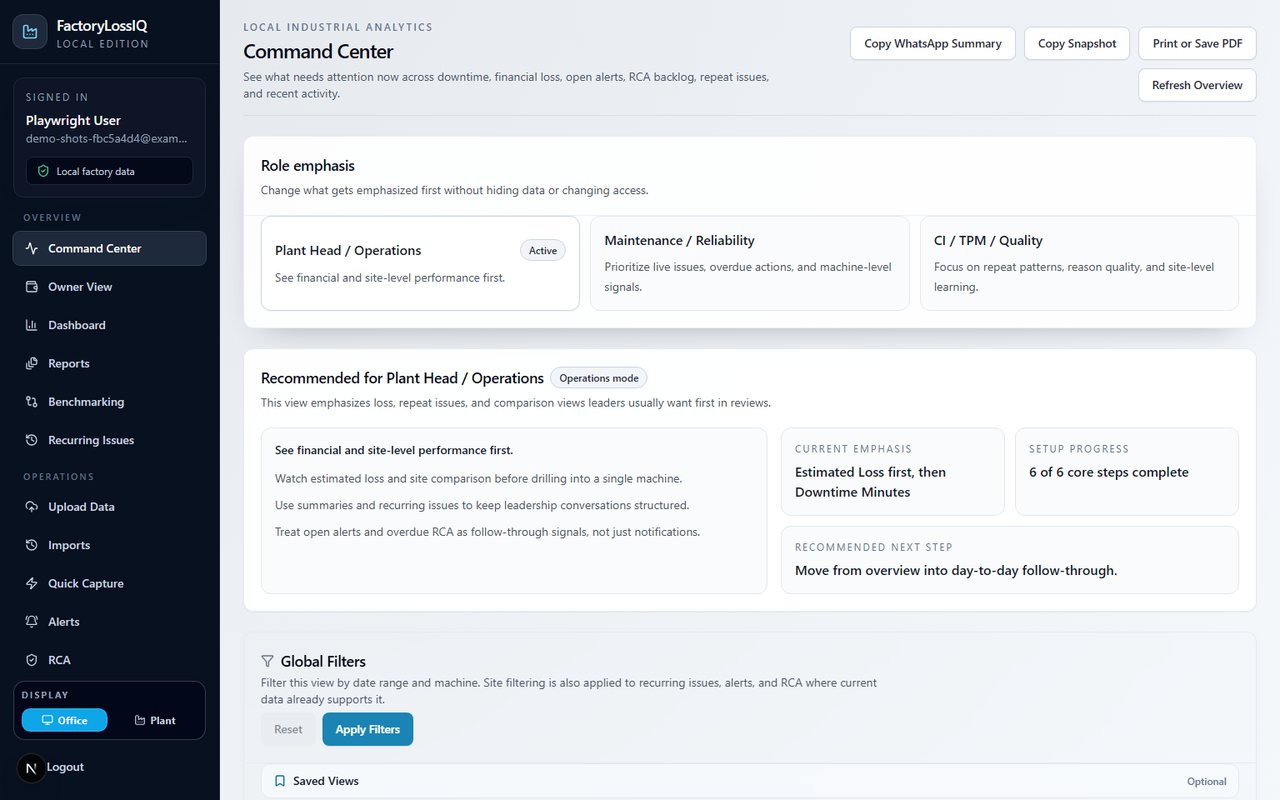
Command Center
Daily operating priorities across loss, alerts, repeat issues, and reports.
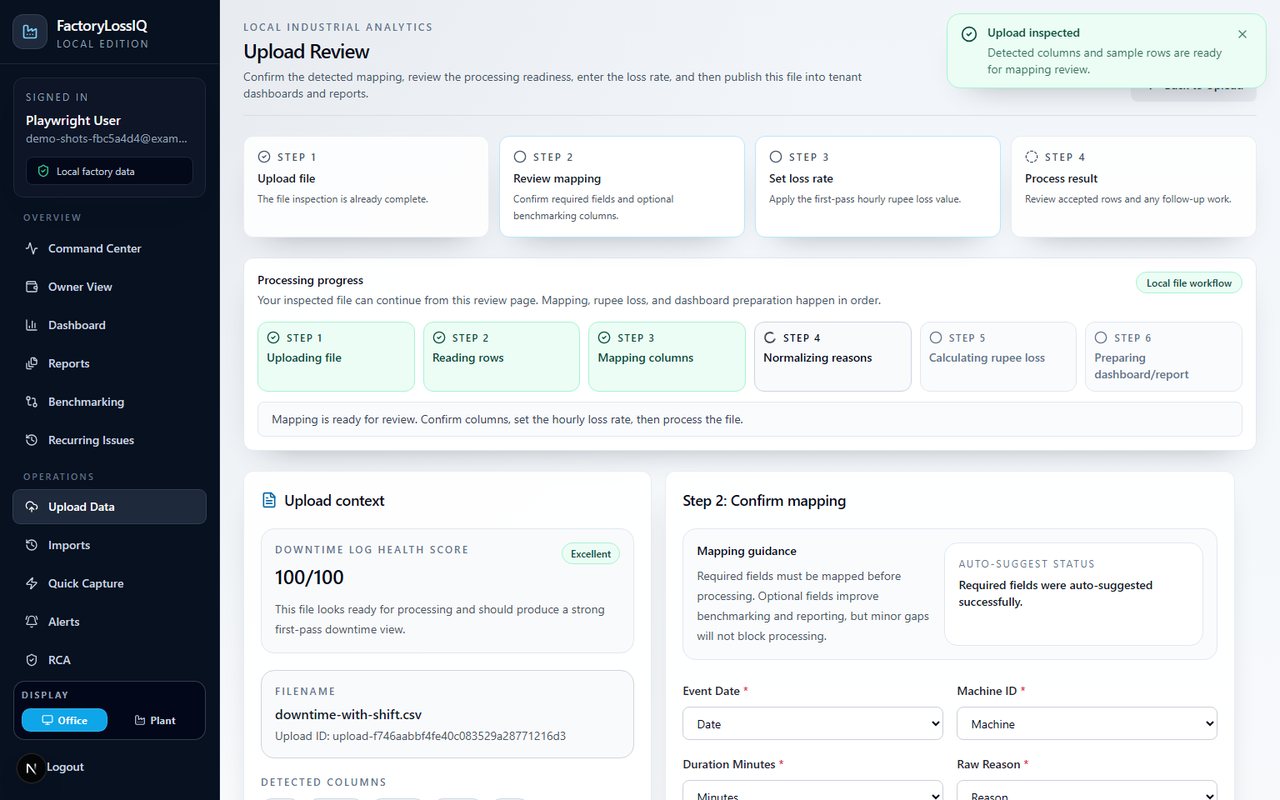
Upload Review
Check mapping and downtime log health before processing.
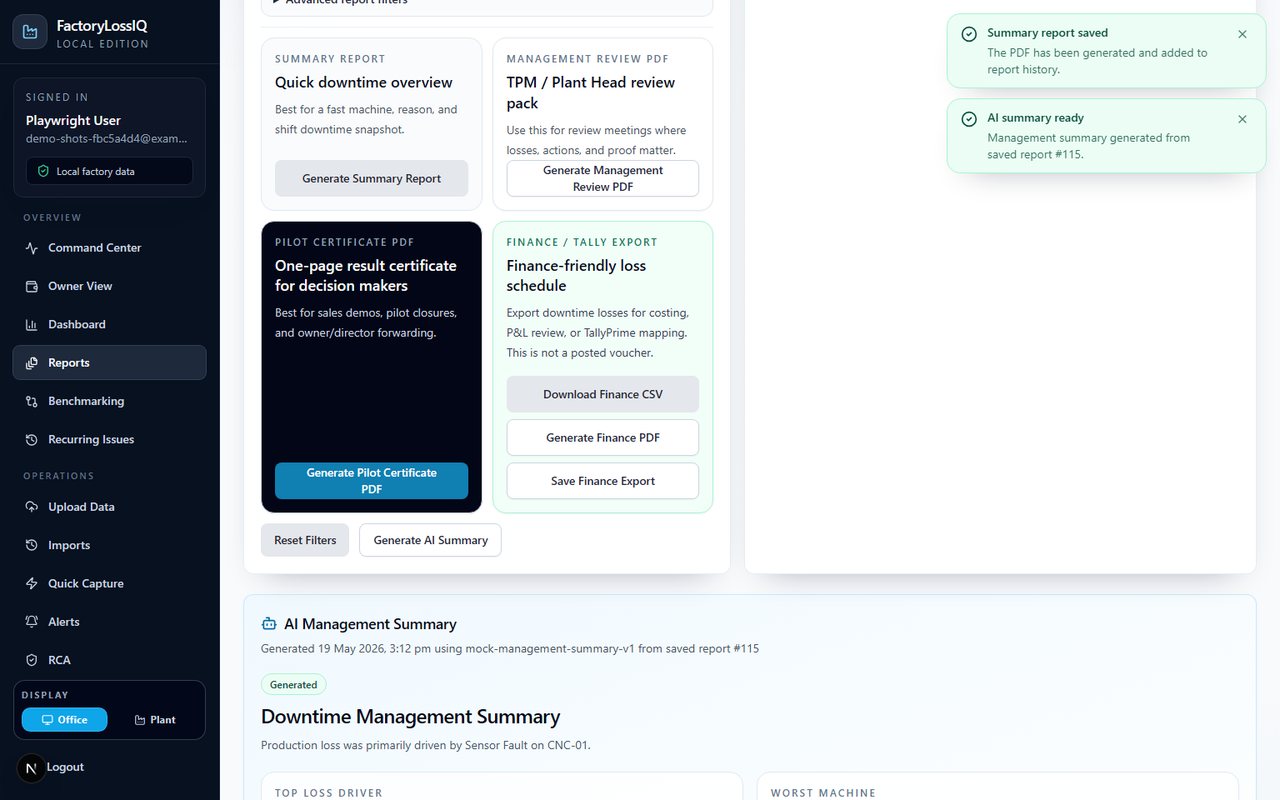
Reports
Generate management, finance, and pilot-ready outputs.
How It Works
From Excel log to owner-ready action in three steps.
Start with the file your factory already maintains.
See machine, reason, shift, and financial loss clearly.
Discuss savings with owners, plant heads, and TPM teams.
Problem
Downtime is recorded, but money loss stays unclear.
Many factories already record downtime in Excel, but owners and plant heads still struggle to see rupee-wise loss clearly. Machine stoppages, reason names, shift patterns, and repeat issues remain scattered across files.
Solution
Turn downtime logs into financial focus and action.
FactoryLossIQ converts downtime logs into financial loss, focus items, savings opportunities, Kaizen actions, WhatsApp summaries, and management-ready reports.
Key Features
Everything needed for a practical factory loss review.
Pilot-Ready Outputs
Useful outputs for sales demos, plant reviews, and finance discussions.
Who It Is For
Built for teams who need clarity without training-heavy software.
Factory owners
Plant heads
TPM teams
Maintenance managers
MSME manufacturers
Local-First Message
Designed for Excel-first factories.
The online demo is available for quick evaluation. The Local Edition can run on a client PC or local plant server during pilot, helping teams keep operational data closer to their own systems.
No PLC, SCADA, or cloud rollout required for Phase 1.
Start with existing downtime Excel/CSV files and prove rupee-wise value first.
Local-First Architecture
Simple pilot setup. No heavy IT rollout.
Start from the files your team already maintains.
Inspect columns, clean reasons, calculate rupee-wise loss, and prepare actions.
Share review-ready outputs with owners, plant heads, TPM, maintenance, and finance teams.
For online evaluation, use the hosted demo. For pilot, FactoryLossIQ Local Edition can run on a client PC or local plant server so operational data stays closer to the factory environment.
FAQ
Common pilot questions
Do we need PLC or SCADA?
No. Phase 1 starts from existing Excel/CSV downtime logs.
Is this a direct Tally integration?
No. It provides Tally-friendly finance export for review and mapping preparation. It does not post vouchers.
Can it run locally?
Yes. The online demo is for quick evaluation. For pilot, the Local Edition can run on a client PC or local plant server so operational data stays closer to the factory environment.
What should we send first?
One sample downtime Excel/CSV file is enough to start a pilot discussion.
Contact
Book a pilot discussion or send a sample downtime file.
Online demo is available for quick evaluation. Local Edition can run on a client PC or local plant server during pilot.